Home · PAi Legal
Offline case law research and legal case management, on your own computer
PAi Legal is a private case workspace for Windows. It reads your files, keeps every matter separate, computes what your case is missing, and never lets a model decide what is true.
It works alone, and it grows
Nothing is required beyond the app itself. Two optional pieces widen what it can do, and the title bar always tells you which mode you are in.
Cases and evidence only. Ingest, OCR, classification, the case map and the deterministic analysis all run here — with no model and no corpus installed.
A private model has been set up, so findings can also be phrased in prose. The findings themselves do not change.
PSi Legal is installed, adding case-law search over its own corpus.
Both. Analysis and case-law search together.
When something is unavailable, the software says which piece is missing, why it could not reach it, and exactly where to get it — rather than hiding the feature or failing quietly. A diagnostics view lists every place it looked and what it found there.

One button, and it becomes a different product
A control stays on screen the whole time you are working: attorney, or plain language. Press it and the vocabulary, the reading order, what gets explained and how a gap is described all change. Press it again and you are back. It is not a setup question you answer once, and it is not a separate edition of the software.
The attorney view speaks in terms of art — operative pleading, controlling authority, elements and burdens — and gets out of the way. The plain-language view names documents by what they are: your main court filing that starts the case, the other side's written answer, something the judge decided. Same engine underneath, same findings, different words.
For a firm that makes it a client tool as much as an accessibility one. When a client asks what any of it means, press the button and turn the screen around. What the plain-language mode does.
What it actually does
Reads the file
PDF, Office, email, scans. Originals preserved, text derived and rebuildable, OCR bundled, every extraction method recorded. Documents are ranked by what they are, because a complaint is not an advertisement.
Ranks what is proven
Four Trust Locks, everything entering at the floor. Repetition never promotes. Pressure never promotes. The top status is not reachable by rule.
Names what is missing
Three channels, a closure rule, and the element your case has not proved yet — including which amounts do not count for the theory you are pleading.
Keeps it yours
Local by construction, loopback enforced, credentials in the OS vault, a sealed audit chain, encrypted portable backups, and role control bound to Windows accounts.
The private AI: it checks your computer, then you choose
Setup does not ask you to know anything about models. It reads this machine first — total and available memory, free disk, logical cores, and whether there is a usable GPU — and shows you what it found in plain numbers.
From that it works out which models this computer can actually run, holding back real headroom for Windows, the context cache and an interrupted download rather than assuming every gigabyte of installed memory is free. Only the models that clear that bar are offered. Then it recommends the strongest one that fits and tells you the download size — and the choice is yours: pick the recommendation, or pick a smaller one from the list if you would rather leave the machine room to breathe.
If the computer cannot run even the light model, it says so instead of installing something that will crawl.
The download is resumable and verified against the publisher's own immutable revision and SHA-256, and the model is launched and tested once before setup calls itself finished. Local AI processing stays on the machine. The optional external drafting path sends the brief you choose to submit to your selected provider. How the download and runtime are secured.

Using a frontier model, without letting it near the case folder
Local models are honest about their limits: a small model running on a laptop CPU is good at phrasing a finding and not good at drafting a brief. So PAi Legal does not pretend otherwise — it hands the work out, on your terms.
Export the case as a drafting brief and PAi Legal opens the bundled drafter in your own browser, with the brief already loaded, served from your own machine over loopback with a one-time token. From there you can point it at a frontier model using your own API key, on the structured brief you chose to export — not on your case folder.
PAi Legal itself will not talk to a remote endpoint. Any AI URL it is given must resolve to loopback, or it is refused.
That refusal is deliberate and it is checked in code, not promised in a policy. It means no setting, no environment variable and no edited config file can quietly turn the app into something that ships case files to a vendor. The frontier path is a separate, visible act: you export a brief, you supply your own key, you see exactly what left.
One matter, one place
Each case is created in the folder or drive you choose — an external drive and a jump drive are first-class answers, not workarounds. Inside it, PAi Legal builds the same structure every time: inbox, preserved originals, extracted text, court papers, depositions, correspondence, exhibits, discovery, index, trace, notes, research, audit and exports. Hand someone the drive and they have that case and nothing else.
Within one case, PAi Legal also separates distinct matters — a denied claim and the malpractice suit that followed are two suits sharing one folder — and records how they connect instead of merging or severing them.
Case law
Case law is not bundled into PAi Legal, and that is deliberate — the app stays small, installs fast, and works completely on its own. Research is the PSi Legal add-on: $30 a month for an index of 5,449,347 legal records, rebuilt every year, plus every case your firm already owns indexed in house — however many, on your own machines, nothing uploaded and nothing metered per document.
What it claims is exactly this: it tells you which cases are worth looking up.
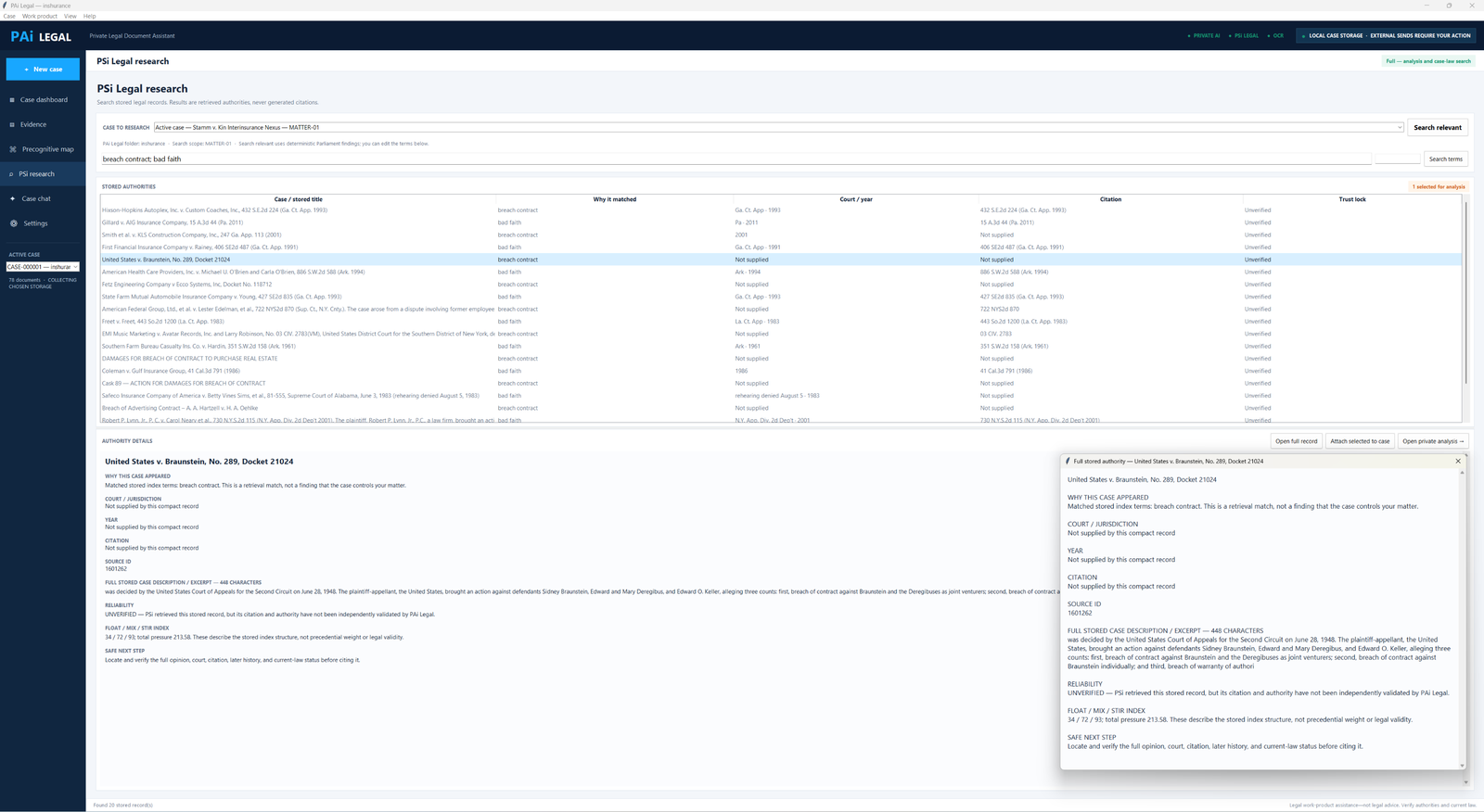
Describe the issue and it returns the authority worth pulling, each result carrying a source id you can trace. That is a genuine piece of work — knowing which five cases to read out of five million is most of the job, and it is the part a keyword search on a public site does badly. What it does not do is hand you the opinion. You take the list and go read it in the reporter, and every result says so on its face: retrieved, unverified, verify the court, the citation and the current status before you rely on it.
The research screen puts it plainly — retrieved authorities, never generated citations. Nothing here invents a case to fill a gap, and nothing here pretends a suggestion is a holding. The index is built from NVIDIA's Nemotron-Pretraining-Legal dataset under CC BY 4.0.
If the subscription lapses, case-law suggestions switch off and nothing else does. Your cases still open, still analyse, still export — the workspace has never depended on it.
The corpus that replaces this index is in build now. It is being assembled from the complete CourtListener public bulk record — 50 GB of opinions plus dockets, clusters, citations and the citation map — with every source file hashed before import, every part verified as it commits, the whole run restart-safe, and so far zero rows rejected across more than 69 million docket rows. That is the version where the suggestion and the opinion live in the same place.
That second half is the one firms underrate. A practice that has been running twenty years is sitting on its own best research — briefs already written, opinions already pulled, matters already argued — and none of it is searchable. PSi Legal indexes all of it locally and puts it in the same result list as the public authority.
For a firm's own library, PSi Legal indexes it locally and PAi Legal reads from it.
Work product that leaves the building on your terms
A case exports as a Markdown or PDF work-product record, or as a structured brief for an external drafter — in the lawyer's vocabulary or in plain English. The plain-English export is what you send a client: the same findings, the same gaps, in language they can read without calling you to translate it. Status letters stop being something you write from scratch. Nothing is transmitted as a side effect of exporting; the software's own header states that external sends require your action.
What you are paying for is a new case, not access to your old ones
Payment creates a case. It never unlocks one.
There is exactly one paid moment in PAi Legal: starting a new matter. Nothing else in the product checks whether you have paid. Opening a case, reading it, searching it, running the analysis, exporting the work product, taking an encrypted backup — none of that asks. Stop paying and every case you already made still opens, still analyses, still exports, on a machine with no internet connection.
That is the opposite of how legal software usually works. A lapsed subscription elsewhere means your own file is behind a paywall in the middle of a matter. Here the cases are files in a folder you chose, and the software has no mechanism to hold them.
The payment path is built to fail in your favour as well. A case credit is reserved rather than spent until the case is actually created, and released if creation fails — a crash or a full disk does not cost you a case. Annual customers are never asked to buy a credit at all. And if the payment ledger is ever lost while your cases remain, the software will not quietly hand you a second free case; it notices and says so.
Price
- The app is free to download, and the first case is free
- Additional single cases are bought one at a time through the Microsoft Store
- Annual access covers unlimited new cases for the year
- Case-law suggestions are the separate PSi Legal add-on at $30 a month, rebuilt yearly — optional, and nothing else stops working without it
- No per-seat licence, no metered usage, nothing to renew to keep reading your own files
Credit where it is due
The shipped index is built from nvidia/Nemotron-Pretraining-Legal-v1, © NVIDIA Corporation, used under CC BY 4.0. The corpus in build draws on the CourtListener bulk data published by the Free Law Project.
The lines it holds
- It computes a finding from your record — it does not predict how a judge will rule, because nothing honest can
- It carries a claim as far as corroborated and stops there; deciding an authority is good law today stays with you
- Jurisdiction checks catch mechanical omissions and cite the rule behind each one, so you know exactly what was checked
- Conflict screening surfaces every possible match for review rather than clearing anything on its own
Need help with the cost?
If you cannot afford the software, contact NFCcop to request free access. See pricing and continued access for standard paid terms. No donation is required to request assistance.